Viral Swipe File
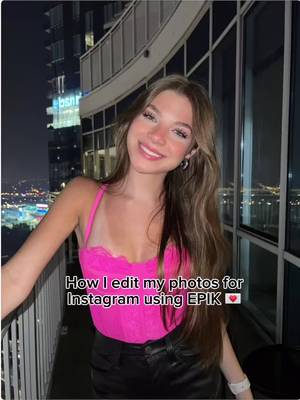

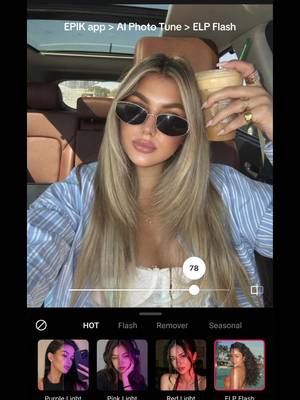
How I edit my photos for Instagram using EPIK
Why it beat its usual
1,101xthe views @maileiderby0 usually gets
613K views
- This video613K
- Usual views557
- AI Photos & Videos median3.7× the median viral factor of the 738 AI Photos & Videos videos in the library (median 297x).
- Creator face over in-app footage median5.9× the median viral factor of the 11,947 Creator face over in-app footage videos in the library (median 186x).
- Views against the AI Photos & Videos nicheabout the median of the 738 AI Photos & Videos videos in the library (median 596,813).
- Engagement against the AI Photos & Videos niche0.9%, below the AI Photos & Videos median of 3.7%.
- Engagement
- 0.93%
 Promotes EPIKPhoto & Video app · 44 videosEPIK playbook
How it's built
- Creator face over in-app footage
- How to hook
- Screen Recording
The hook promises to teach something useful, built to keep the viewer for the steps. Built as Screen Recording: a recording of a phone or computer screen. A creator speaks as themselves, built to read like a post from someone the viewer follows. It presses on curiosity: wanting to know what happens or how. The tone is educational.
It is pitched at viewers who know solutions exist, so it names the kind of solution, not this one.
- Hook on screen
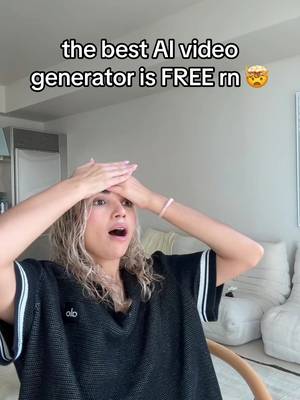
- “How I edit my photos for Instagram using EPIK”
- First words said
- “I'm going to show you how I transform my photos to make them Instagram worthy using EPIK.”
What's said
1:21 · EnglishI'm gonna show you how I transform my photos to make them Instagram worthy using the epic editing app. Epic is my favorite photo editing app. Here I'm going in with the manual skin smooth feature.
I had a lot of texture on my T zone as you can see here, so I'm just going in and smoothing out that texture on my face. And then I'm going in with the manual skin blemish feature, which allows me to kind of zap little blemishes on my face and on my chest. Here. I had a lot going on, so I also did the same there. Super subtle. Then I went in with the manual skin eye bags feature, which allows me to smooth out the eye bags I have.
Even though I have makeup on, you can still see them and I want to get rid of those for my Instagram photo. Then I wanted to add some color back into my face is the end of the night kind of rubbed off, so I went in with the makeup blush angled blush feature. It just allows me to add some of that pretty pink color back into my face. They have so many colors to choose from! Here I'm going in with the hair feature and I'm doing hair texture.
This just makes my hair look so smooth, kind of removes the frizz and just makes my hair look so soft. I also edited around my ears so that It doesn't look as harsh. Doesn't that look so pretty? Now I'm going in with the adjust feature and doing the brilliance, which is gonna help. Just the photo looked more defined, especially because of the lighting that I was taking the picture in. Here's a before and after editing with the epic app.
This picture is now Instagram ready. I love the subtle changes. That really made a big difference.
The words behind 1,101x its usual
Make your own
“How I edit my photos for Instagram using EPIK”
Same format: Creator face over in-app footage
Highest viral factor first · All
 393Kxhaving a community of other people who love music just as much as me…
 369Kxnothing more humbling than when you find out you don't know your…
 329Kxthe feeling when you meet someone with your same music taste >>>
 230KxLife is so good when you have friends who love music as much as you…
 157KxTO EVERYONE GOING BACK TO SCHOOL!!!
 43KxCLAUDE can do WHAT???
 43KxTutorial on how I created these pictures with The Grinch
 42KxHOW TO START CLIPPING
 41Kxgoogle docs just added a new button... and it shows you've used…
 41KxWalking on stage confidently with my high grades
 39Kx3 REASONS WHY YOU NEED TO DELETE SNAP!!!
 36Kxlow-pixel photography is blowing up
Same niche: AI Photos & Videos
Highest viral factor first · All
 23KxPranking my football obsessed bf I met "some guy on the plane" ✈️ &…
 22Kxcreo k ya no necesito cámara... miren la foto k saqué con snap it
 22KxAre you a long hair or short hair girly?
 21KxTop 6 mejores IAs para usar ahora mismo 🤖
 21Kxpov: AI looks too real
 21KxEncontré cómo hacer el efecto crepúsculo
 21KxShocked at how I look as an VS angel
 21KxNo necesitas sacarte fotos cuando existe la ia
 20KxPov: ya no te sacas fotos porque la IA da mejores resultados
 20KxTu tan Barbie y yo tan WEDNESDAY
 18KxI can't believe this is AI
 17Kxliteral esta app parece que cualquier foto parezca sacada con camara…
About this video
1,101x: about 1,101 times the views @maileiderby0 usually gets. Viral factor divides a video's views by its account's usual views, so it measures how far the video beat its creator's normal reach, whatever the size of the account. 0.9% engagement rate. 4,860 likes, 15 comments, 51 shares, 761 saves. Filed under AI Photos & Videos and Creator face over in-app footage.