Viral Swipe File
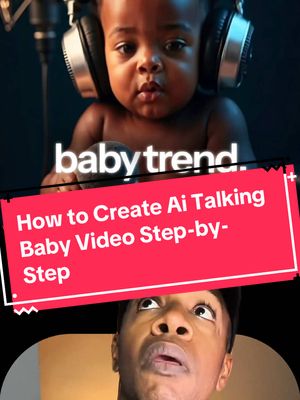

How to Make a Viral AI Talking Baby Video
AI Photos & Videos · Laptop Display, Step-by-Step Tutorial, Creator face over in-app footage
Why it beat its usual
398xthe views @ai.for.real.life usually gets
128K views
- This video128K
- Usual views322
- AI Photos & Videos median1.3× the median viral factor of the 738 AI Photos & Videos videos in the library (median 297x).
- Laptop Display median11× the median viral factor of the 3,122 Laptop Display videos in the library (median 37.8x).
- Step-by-Step Tutorial median3.7× the median viral factor of the 682 Step-by-Step Tutorial videos in the library (median 108x).
- Creator face over in-app footage median2.1× the median viral factor of the 11,948 Creator face over in-app footage videos in the library (median 186x).
- Views against the AI Photos & Videos nichebelow the median of the 738 AI Photos & Videos videos in the library (median 596,813).
- Engagement against the AI Photos & Videos niche9.2%, above the AI Photos & Videos median of 3.7%.
- Engagement
- 9.21%
How it's built
- Laptop Display
- Step-by-Step Tutorial
- Creator face over in-app footage
- How to hook
- Screen Recording
- App Mockup
- Text Overlay
The hook promises to teach something useful, built to keep the viewer for the steps. Built as Screen Recording, App Mockup and Text Overlay. A creator speaks as themselves, built to read like a post from someone the viewer follows. It presses on curiosity: wanting to know what happens or how. The tone is educational.
It is pitched at viewers who know solutions exist, so it names the kind of solution, not this one.
- Hook on screen
- “How to Make a Viral AI Talking Baby Video”
- First words said
- “Hey Khalil, so you made a video about this talking baby trend, which I think is kind of stupid because, you know, babies don't even talk like that. But anyways, people keep asking me how to actually make one. So are you gonna show us or what?”
What's said
2:07 · EnglishHey Khalil, so you made a video about this talking baby trend, which I think is kind of stupid because, you know, babies don't even talk like that. But anyways, people keep asking me how to actually make one. So are you gonna show us or what? Alright, alright, I got you.
So let's break down exactly how to make one of these AI talking baby videos step by step. First off, you need the baby image, and here's the prompt that I used to generate mine. You can screenshot it, copy it, whatever. So what I did was I dropped that into Leonardo AI using the flux model. But honestly you can use any of your favorite image generators journey, dramina. Or you can try out a few of them on platforms like Creya and Free Pick.
You can test a few and just see which gives you the best results. So once I had the baby image, in this case a baby podcaster, I need an audio now? You've got options here. You can use a meme or a comedy clip from YouTube. And what I did is I just played the video on my phone and use the screen record function. So on the iPhone you just swipe down and hit the screen record and it's super simple. Or you can make it with your own voice or use 11 Labs.
So when I use 11 labs, I usually record myself reading the line exactly how I Want it to sound? Then I let 11 labs generate it in the voice that I choose. Hey, Khalil. So you made a video about this talking baby trend, which I think is kind of stupid because babies don't even talk like that, but people keep asking me how to actually make one. So are you gonna show us or what? And that gives the best results for me. Sometimes it just sounds too AI if I do it the other way.
So once you have your image and your audio, it's time for that final step. You drop them both into hedra, upload your image, upload your audio, then you let it process. And in hedra, you can actually add a prompt to tell it how you want your character to act to give it a little bit more direction. And then, boom, you've got a talking AI baby video. So you can even drop that back into CapCut if you want to clean it up or add captions, effects, whatever.
So that's really how you do it? It doesn't have to be a baby. It can be any face, cartoon, puppet, or even an animal. But this is the trend right now, and it's hot. And if you made it to the end of this video, go ahead and give me a follow so I can do more deep dives like this.
The words behind 398x its usual
Make your own
“How to Make a Viral AI Talking Baby Video”
Same format: Laptop Display
Highest viral factor first · All
 47KxPosting this in case he deletes it 🤯🚨
 42KxHOW TO START CLIPPING
 40Kxoh he don't wanna read all that?????? #womeninmalefields
 35Kxohh he's not reading all that?? okay then
 31KxThis App Tells You When You're Gonna DIE
 27KxInstall Sekarang !
 17Kxto the person who showed me how ai can take notes for me while i…
 17KxAfter 2 years of IELTS prep, I just found this????
 14KxI'm giving you a 0 you've clearly used AI
 13KxIs it just me or do college students not fully understand what…
 13KxRaise your hand if you have less than A thousand dollars in your…
 13KxBest AI Tools For Students
Same niche: AI Photos & Videos
Highest viral factor first · All
 53Kxreacting to what our babies would look like
 52KxTODAS las fotos con este filtro quedan lindas
 47KxNo vuelvo a sacarme selfies normales después de descubrir este filtro
 43KxTutorial on how I created these pictures with The Grinch
 41Kxgoogle docs just added a new button... and it shows you've used…
 36Kxlow-pixel photography is blowing up
 34Kxel filtro lo es todooo😮💨😮💨
 30KxTutorial on how I did this with Justin Bieber
 30KxEmocionada por Merlina?
 28KxIf only our greatest moment of intimacy could be our greatest moment…
 27KxHow I made these pictures with the Grinch?
 27KxDoes it take pink night vision shots?
About this video
398x: about 398 times the views @ai.for.real.life usually gets. Viral factor divides a video's views by its account's usual views, so it measures how far the video beat its creator's normal reach, whatever the size of the account. 9.2% engagement rate. 5,576 likes, 163 comments, 1,120 shares, 4,964 saves. Filed under AI Photos & Videos, Laptop Display, Step-by-Step Tutorial and Creator face over in-app footage.