Viral Swipe File
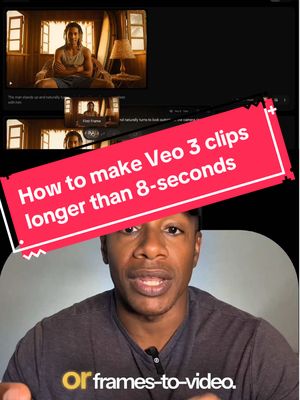

Everybody thinks you can only make eight second videos with Veo 3
AI Photos & Videos · Step-by-Step Tutorial, Creator face over in-app footage
Why it beat its usual
1,380xthe views @ai.for.real.life usually gets
444K views
- This video444K
- Usual views322
- AI Photos & Videos median4.6× the median viral factor of the 738 AI Photos & Videos videos in the library (median 297x).
- Step-by-Step Tutorial median13× the median viral factor of the 682 Step-by-Step Tutorial videos in the library (median 108x).
- Creator face over in-app footage median7.4× the median viral factor of the 11,948 Creator face over in-app footage videos in the library (median 186x).
- Views against the AI Photos & Videos nichebelow the median of the 738 AI Photos & Videos videos in the library (median 596,813).
- Engagement against the AI Photos & Videos niche8.2%, above the AI Photos & Videos median of 3.7%.
- Engagement
- 8.19%
How it's built
- Step-by-Step Tutorial
- Creator face over in-app footage
- Curiosity hook
- Screen Recording
- App Mockup
The hook opens a question, built to keep the viewer watching until it closes. Built as Screen Recording and App Mockup. A creator speaks as themselves, built to read like a post from someone the viewer follows. It presses on curiosity: wanting to know what happens or how. The tone is educational.
It is pitched at viewers who know solutions exist, so it names the kind of solution, not this one.
- Hook on screen
- “Everybody thinks you can only make eight second videos with Veo 3”
- First words said
- “Everybody thinks you can only make eight second videos with v 0 3”
What's said
2:01 · EnglishEverybody thinks you can only make eight second videos with v 0 3 but we're gonna show you something different. So everybody keeps asking me how are you making these v 0 3 clips that are longer than eight seconds? Well, I'm gonna break it down for you real quick.
The first thing is that you have to be inside of the flow platform, not in Gemini so go to Google Labs, log into your Google account and yes, you need a pro or alter account and then either start a new project or pick up where you left off and once you're in, go ahead and make your first clip. It doesn't matter if it's text to video or frames to video just go ahead and build that first clip and once it's done you click add to scene and that drops your clip into their scene builder and that's where the magic happens.
Now from here there are two ways to actually extend your clip. The first way, which is the easiest is to click that little plus icon at the end of your clip and just hit extend then you just describe what you want to happen next but here's the catch right now this only works with the v 0 2 fast model so that means no sound and the quality is not quite as good as v 0 3 but the second way, and this is the way that I've been using lately is the Frames to video hack so at the end of your clip or wherever you want to continue from you hover over the little plus icon then you click Save Frame as asset and that locks in a still image of that frame now you take that saved frame and use it as your starting
point in the frames to video and then you write your next prompt and describe what happens next and what's work best for me is to reuse the original prompt and only change the parts that you want to actually change because if you don't things start to shift the background changes, your character's skin tone changes all kinds of stuff so in my opinion it's best to be specific every time and once you've generated that new clip you've got your next 8 seconds and then you stack that right next to the last one in their scene builder and just keep repeating this process and once you're ready you hit download and it gives you one continuous scene so basically you can do this until you run out of credits
so is this process perfect yet? No, but it works and I've got a feeling that the extend option is gonna support b 0 3 really soon so go ahead and jump into flow, mess around with Scene Builder and let me know in the comments if you found a better way or a better method or a better tool let's figure this whole Thing out together.
The words behind 1,380x its usual
Make your own
“Everybody thinks you can only make eight second videos with Veo 3”
Same format: Step-by-Step Tutorial
Highest viral factor first · All
 373KxHere's how to have the best summer.
 107KxThis is the BEST summer idea!!!
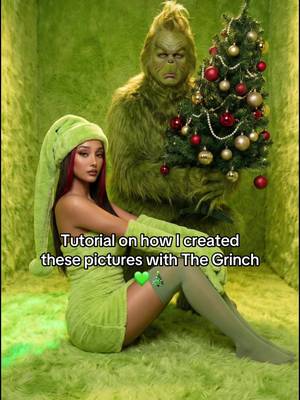 43KxTutorial on how I created these pictures with The Grinch
 17Kxhow do I make an acorn squash easier to cut
 16KxMy FAVORITE cooking hack is this app 🙌🏼
 16KxPlease don't make the same mistake I did.
 15KxThis Tumeric All In One Is shockingly good🙌🏾
 14KxDon't they use this for corn?
 7,589xHow to make $5k a month using AI
 7,216xDrawer slipping out or getting stuck
 6,216xDo you know what grows in your Ice Machine?
 5,130xKim Kardashian's Chia Seed Pudding
Same niche: AI Photos & Videos
Highest viral factor first · All
 87KxHow I created these pictures with the Grinch?! 🤩
 15KxMe & my Christmas menace
 15KxWhen the moon comes out.
 15KxLet's give Benny Blanco a life changing makeover!
 14KxCan we see what sunset looks like?
 14KxСекрет виральных AI-видео с корейских трибун: Полный разбор тренда
 14KxPranking my bf I went on a morning jog to see if he notices Messi in…
 13KxSTOP letting insta RUIN your horizontal pics
 13KxLe hice creer a mi mamá que había un tsunami
 13KxPranking my bf I met "some footballer" today
 12KxPosso morrer feliz se consegui uma foto como essa
 12KxTutorial Fotos del Grinch
About this video
1,380x: about 1,380 times the views @ai.for.real.life usually gets. Viral factor divides a video's views by its account's usual views, so it measures how far the video beat its creator's normal reach, whatever the size of the account. 8.2% engagement rate. 16,983 likes, 410 comments, 3,111 shares, 15,885 saves. Filed under AI Photos & Videos, Step-by-Step Tutorial and Creator face over in-app footage.