Viral Swipe File
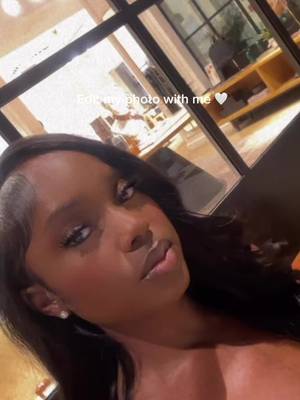

Editing Tutorial 🤍
AI Photos & Videos · Creator face over in-app footage, Before vs After
Why it beat its usual
170xthe views @lashajae usually gets
126K views
- This video126K
- Usual views740
- AI Photos & Videos medianbelow the median viral factor of the 738 AI Photos & Videos videos in the library (median 297x).
- Creator face over in-app footage medianbelow the median viral factor of the 11,947 Creator face over in-app footage videos in the library (median 186x).
- Before vs After median2.8× the median viral factor of the 270 Before vs After videos in the library (median 60.9x).
- Views against the AI Photos & Videos nichebelow the median of the 738 AI Photos & Videos videos in the library (median 596,813).
- Engagement against the AI Photos & Videos niche1.4%, below the AI Photos & Videos median of 3.7%.
- Engagement
- 1.43%
 Promotes EPIKPhoto & Video app · 44 videosEPIK playbook
How it's built
- Creator face over in-app footage
- Before vs After
- Explainer hook
- Screen Recording
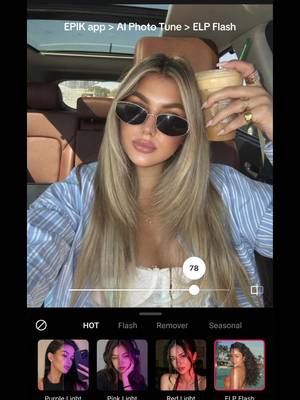
The hook shows how the product works, built to make it clear in a few seconds. Built as Screen Recording: a recording of a phone or computer screen. A creator speaks as themselves, built to read like a post from someone the viewer follows. It presses on curiosity: wanting to know what happens or how. The tone is educational.
It is pitched at viewers who know solutions exist, so it names the kind of solution, not this one.
- Hook on screen
- “Editing Tutorial 🤍”
- First words said
- “I get a lot of questions about my makeup and my editing, so here's a tutorial.”
What's said
1:01 · EnglishI get a lot of questions about my makeup and my editing, so here's a tutorial. I took this photo using my Canon and 50, and I'm editing using the epic app. To start, I'm gonna go on with the tool wrinkle with my makeup, sometimes I experience a lot of creasing, so I use this tool to get rid of that.
Also use this tool for any other harsh lines that I may have on my face, so being my smile lines. And then I also noticed that I had a pretty harsh concealer line under my eyebrow, so I went ahead and got rid of that too. And then I use it for anything else that I may notice that's out of place. Next I go in with the tool paint. I've always been on the hunt for the perfect contact, but I've never been able to find it.
So I use this as my little hack to lighten dark brown eyes without making them too unrealistic. Lastly, I'm gonna go in with a tool pore. I use this as a replacement for smooth because it removes all of my blemishes while still giving me a very natural finish. I use it to blur my imperfections but still look like skin. Here's a before and after. Let me know if you have any questions.
The words behind 170x its usual
Make your own
“Editing Tutorial 🤍”
Same format: Creator face over in-app footage
Highest viral factor first · All
 107KxThis is the BEST summer idea!!!
 103KxPOV: you have a 11:59 deadline
 100KxI could literally KISS the therapist that showed me this
 87KxHow I created these pictures with the Grinch?! 🤩
 82Kxall the besties im bouta makeee 😝
 80KxPOV: you wake up drenched in sweat but it's winter
 80Kx13 goals is the WC record. Can it be broken?
 78KxGod bless the girl who read through the entire Bible but made it…
 75Kxthis is me after I installed the knowunity app:
 65KxHold up. Wait a minute.
 65KxI love Gen Z, wdym someone made an app combining Ig and Spotify…
 65KxDrake Maye is going to cook Buffalo
Same niche: AI Photos & Videos
Highest viral factor first · All
 30KxTutorial on how I did this with Justin Bieber
 30KxEmocionada por Merlina?
 28KxIf only our greatest moment of intimacy could be our greatest moment…
 27KxHow I made these pictures with the Grinch?
 27KxDoes it take pink night vision shots?
 24KxLo que piensa mi novio cuando le menciono a un hombre...
 23KxPranking my football obsessed bf I met "some guy on the plane" ✈️ &…
 22Kxcreo k ya no necesito cámara... miren la foto k saqué con snap it
 22KxAre you a long hair or short hair girly?
 21KxTop 6 mejores IAs para usar ahora mismo 🤖
 21Kxpov: AI looks too real
 21KxEncontré cómo hacer el efecto crepúsculo
About this video
170x: about 170 times the views @lashajae usually gets. Viral factor divides a video's views by its account's usual views, so it measures how far the video beat its creator's normal reach, whatever the size of the account. 1.4% engagement rate. 1,585 likes, 9 comments, 22 shares, 181 saves. Filed under AI Photos & Videos, Creator face over in-app footage and Before vs After.