 Viral Swipe File
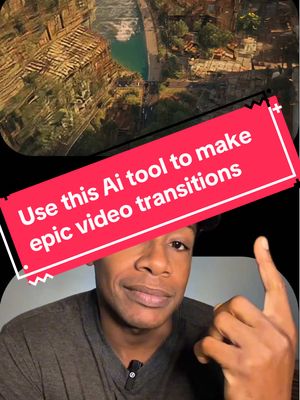

How I use AI to make EPIC transitions
Creative Tools · Creator face over in-app footage, Fade-In Transition
Why it beat its usual
322xthe views @ai.for.real.life usually gets
103K views
- This video103K
- Usual views321
- Creative Tools median11× the median viral factor of the 1,381 Creative Tools videos in the library (median 28.5x).
- Creator face over in-app footage median1.7× the median viral factor of the 11,948 Creator face over in-app footage videos in the library (median 186x).
- Fade-In Transition median1.4× the median viral factor of the 57 Fade-In Transition videos in the library (median 223x).
- Views against the Creative Tools nichebelow the median of the 1,381 Creative Tools videos in the library (median 453,945).
- Engagement against the Creative Tools niche8.7%, above the Creative Tools median of 4.1%.
- Engagement
- 8.70%
How it's built
- Creator face over in-app footage
- Fade-In Transition
- Curiosity hook
- Screen Recording
- UGC Overlay
The hook opens a question, built to keep the viewer watching until it closes. Built as Screen Recording and UGC Overlay. A creator speaks as themselves, built to read like a post from someone the viewer follows. It presses on curiosity: wanting to know what happens or how. The tone is educational.
It is pitched at viewers who know solutions exist, so it names the kind of solution, not this one.
- Hook on screen
- “How I use AI to make EPIC transitions”
- First words said
- “So this is how I use AI to go from normal transitions to these kind of transitions.”
What's said
1:00 · EnglishSo this is how I use AI to go from normal transitions to these kind of transitions. See, there's a platform that's got pretty popular lately, but it's mainly for the way that it generates these insane effects and camera movements using AI. And it's called higgsfield.
And you probably already heard about it. But here's the thing. Most people are using it to create these amazing shots, which are pretty cool. But what a lot of people don't realize is that you can use the same tools to take your transitions to the next level. Like this one, for example. I layered the FPV drone motion with the Super Dolly in, and this is what it came up with. And just like that, my transition got a lot more creative and a lot more interesting.
So yeah, if you're trying to level up your edits, definitely check this out. And if you want me to break down exactly how I did it step by step, drop a comment and let me know. I might do that one in my next video and possibly a full breakdown in my newsletter. The link is in my profile.
The words behind 322x its usual
Make your own
“How I use AI to make EPIC transitions”
Same format: Creator face over in-app footage
Highest viral factor first · All
 65KxDrake Maye is going to cook Buffalo
 65Kxme: i would be the best kpop idol ever fr i would never get into a…
 63Kxthe type of friend I NEED
 62KxHow to best summer
 61KxMe when my period is late but I feel cramps
 59Kxrun don't walk to equals before it becomes a super popular app so…
 57KxPOV: you try send a freaky text but realize your lwk js a weirdo
 53Kxreacting to what our babies would look like
 53Kxthe easiest way to learn a language
 51KxPOV: You're a dark romance reader and you're starting to use BookTok
 49KxForget your IG, gimme your Equals so I can see ur music taste
 49Kxthings I tried before I finally became consistent at the gym
Same niche: Creative Tools
Highest viral factor first · All
 44KxSi tú también quieres ser #merlina usa mi código POPIA en @Glam AI…
 37Kxtutorial for photos like this
 27KxMe in my room taking random low quality selfies:
 18Kx"como te salen tan bien las fotos con flash?"
 18Kxestas fotos las saque YO???
 18KxNo sabia que las que hacemos crochet teníamos una app para nosotras
 17Kxus and our fav digicam app
 17KxFirst rule of IG: NEVER waste good photos like this
 15Kxupdate on the app i'm building with replit (and a sneak peek)
 14KxDon't they use this for corn?
 14KxAN ALLE, DIE WIEDER IN DIE SCHULE STARTEN!!!
 12KxYou're telling me there's an app that lets you print 45 free…
About this video
322x: about 322 times the views @ai.for.real.life usually gets. Viral factor divides a video's views by its account's usual views, so it measures how far the video beat its creator's normal reach, whatever the size of the account. 8.7% engagement rate. 3,861 likes, 141 comments, 927 shares, 4,120 saves. Filed under Creative Tools, Creator face over in-app footage and Fade-In Transition.