Viral Swipe File
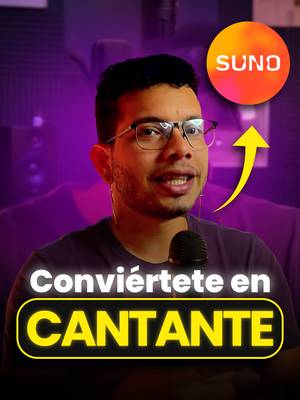

¡Transforma tu voz en 5 estilos musicales diferentes!
Creative Tools · Live App Scroll, Step-by-Step Tutorial, Creator face over in-app footage
Why it beat its usual
176xthe views @jedahunteroficial usually gets
55K views
- This video55K
- Usual views311
- Creative Tools median6.2× the median viral factor of the 1,381 Creative Tools videos in the library (median 28.5x).
- Live App Scroll medianbelow the median viral factor of the 2,336 Live App Scroll videos in the library (median 206x).
- Step-by-Step Tutorial median1.6× the median viral factor of the 682 Step-by-Step Tutorial videos in the library (median 108x).
- Creator face over in-app footage medianbelow the median viral factor of the 11,947 Creator face over in-app footage videos in the library (median 186x).
- Views against the Creative Tools nichebelow the median of the 1,381 Creative Tools videos in the library (median 453,945).
- Engagement against the Creative Tools niche5.0%, above the Creative Tools median of 4.1%.
- Engagement
- 4.98%
How it's built
- Live App Scroll
- Step-by-Step Tutorial
- Creator face over in-app footage
- Curiosity hook
- Screen Recording
- App Mockup
The hook opens a question, built to keep the viewer watching until it closes. Built as Screen Recording and App Mockup. A creator speaks as themselves, built to read like a post from someone the viewer follows. It presses on curiosity: wanting to know what happens or how. The tone is educational.
It is pitched at viewers who know solutions exist, so it names the kind of solution, not this one.
- Hook on screen
- “¡Transforma tu voz en 5 estilos musicales diferentes!”
- First words said
- “Today I’ve got a fun, creative experiment for you.”
What's said
4:30 · SpanishToday I’ve got a fun, creative experiment for you. I’m going to turn my voice into five different music genres, using Suno’s AI. Let’s see what my voice sounds like as a reggaeton singer, a merengue singer, a salsa singer, a pop singer, and even a vallenato singer. How?
For this experiment, here’s what I’m going to do: I’m going to write some lyrics with ChatGPT, and then I’m going to record my voice, trying to sing those lyrics. I’m going to go to ChatGPT, and ask it to make me a short, simple song, easy to remember, about the joy of living with a good attitude. And it already generated it for me. Now let’s record my voice using the lyrics ChatGPT gave us: “Joy is everything.” “It’s awful.”
Done! Now in Suno—I already showed this in a previous video— what do we need to do? We’re going to hit Create, then go to Customize, and then use the last option we have in Suno’s AI engine, in this case, version number 5. I’m going to click the Audio option here. As you can see, I can either upload an audio file or record it directly in Suno. I’ve already added the audio here, and to make sure Suno uses our voice as closely as possible, I’m going to go to the Person option, and create a person.
I’m going to select the remastered song. If you want, you can upload a photo—it doesn’t matter. I’m going to turn off the Public option, because I don’t want other people using my voice, and then I’ll hit Save. Now that the person—me—has been created, I’m going to hit Select now. It shows up selected here, and now I’m going to create the song. I’m going to paste the song lyrics in now. I asked ChatGPT to make a prompt for me for a classic reggaeton song.
All the prompts I’m going to use in this video I’ll leave for you to download as a PDF, so you can have them. If you want to use them. I’m going to paste the prompt into Style, in Advanced options. I’ll leave it exactly as it is, and I’m going to increase the influence of the original audio to 70%. All the songs are ready now. I put on my headphones to hear the result better, so let’s go with classic reggaeton. Now for merengue: “Joy is everything you need to be happy.”
Now let’s go with salsa. Okay, let’s do a test, with me trying to sing the song it already created, to see if maybe that way it sounds a little more like my voice, because I’ll admit the first recording was kind of… like… I mean, I don’t know. Maybe if I sing it with better pitch, it’ll sound a little more like the voice the AI created. I don’t know—tell me, does it or doesn’t it? Vallenato: I love living with attitude, always with love, uh-huh, with a smile, always—I’m sure of it.
Now let’s go with pop rock. I really liked it. In general, I think most of the voices, at least the ones generated with AI, sound a lot alike. I can’t say it’s 100%, not even 70%, like my actual voice, but I do think that if I sing the songs better, the ones created with AI, and I try to imitate that voice, then it might sound a little more like my voice. So, honestly, which of the genres we created sounds the most like my voice?
The words behind 176x its usual
Make your own
“¡Transforma tu voz en 5 estilos musicales diferentes!”
Same format: Live App Scroll
Highest viral factor first · All
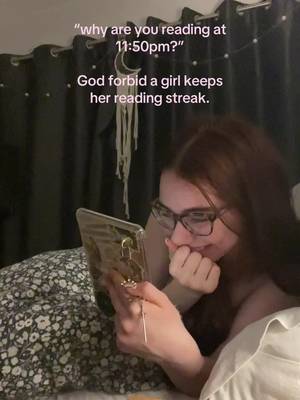 27Kxwhy are you reading at 11:50pm?
 26KxI didn't know this could happen during Perimenopause!?!
 26Kxi found the cutest wedding idea ever!
 20KxWhy is Spanish so hard???
 19KxWHY IS TURKISH SO HARD
 18KxUr telling me I shopped at Aldi for 8 YEARS and never knew this?!?!?
 18Kx"como te salen tan bien las fotos con flash?"
 18KxGIRLS I GOT MY PERIOD!!!
 17KxAfter 12 years I learned you do Amazon completely wrong
 17KxFlirted so hard, this is how my boyfriend updates me 🤭🤭
 16KxMy FAVORITE cooking hack is this app 🙌🏼
 16KxStop guessing your macros
Same niche: Creative Tools
Highest viral factor first · All
 44KxSi tú también quieres ser #merlina usa mi código POPIA en @Glam AI…
 37Kxtutorial for photos like this
 27KxMe in my room taking random low quality selfies:
 18Kxestas fotos las saque YO???
 18KxIphone 15 😅😂
 18KxNo sabia que las que hacemos crochet teníamos una app para nosotras
 17Kxus and our fav digicam app
 17KxFirst rule of IG: NEVER waste good photos like this
 15Kxupdate on the app i'm building with replit (and a sneak peek)
 14KxDon't they use this for corn?
 14KxAN ALLE, DIE WIEDER IN DIE SCHULE STARTEN!!!
 12KxYou're telling me there's an app that lets you print 45 free…
About this video
176x: about 176 times the views @jedahunteroficial usually gets. Viral factor divides a video's views by its account's usual views, so it measures how far the video beat its creator's normal reach, whatever the size of the account. 5.0% engagement rate. 1,449 likes, 91 comments, 266 shares, 937 saves. Filed under Creative Tools, Live App Scroll, Step-by-Step Tutorial and Creator face over in-app footage.