Viral Swipe File
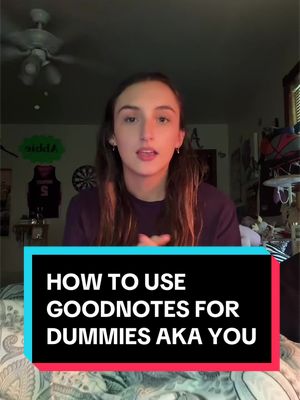

HOW TO USE GOODNOTES
Education · Digital Note Tutorial, Step-by-Step Tutorial, Creator face over in-app footage
Why it beat its usual
1,233xthe views @abbie_groy usually gets
1M views
- This video1M
- Usual views830
- Education median15× the median viral factor of the 6,803 Education videos in the library (median 84.6x).
- Digital Note Tutorial median13× the median viral factor of the 222 Digital Note Tutorial videos in the library (median 92.8x).
- Step-by-Step Tutorial median11× the median viral factor of the 682 Step-by-Step Tutorial videos in the library (median 108x).
- Creator face over in-app footage median6.6× the median viral factor of the 11,947 Creator face over in-app footage videos in the library (median 186x).
- Views against the Education niche3.9× the median of the 6,803 Education videos in the library (median 262,473).
- Engagement against the Education niche22.7%, above the Education median of 8.6%.
- Engagement
- 22.7%
- Rank in Digital Note Tutorial
- #22
How it's built
- Digital Note Tutorial
- Step-by-Step Tutorial
- Creator face over in-app footage
- How to hook
- Screen Recording
- App Mockup
The hook promises to teach something useful, built to keep the viewer for the steps. Built as Screen Recording and App Mockup. A creator speaks as themselves, built to read like a post from someone the viewer follows. The tone is educational.
It is pitched at viewers who know solutions exist, so it names the kind of solution, not this one.
- Hook on screen
- “HOW TO USE GOODNOTES”
- First words said
- “How to use goodnotes for dummies.”
What's said
3:25 · EnglishHow to use goodnotes for dummies. I mean, freshman in college. Okay, let's run it. If you're new here, my name is Abby. I'm a rising sophomore at Penn State Berks, and I'm gonna help you get through college. Grab your ipads, ladies and gentlemen, we're opening good notes.
As you can see, I break all my classes down into folders. If you guys aren't doing that, you're doing it wrong. So to open one of these, you're gonna hit new, and then you're gonna hit folder. This is gonna make a folder. Okay? So I'm taking a stats class, so I'm gonna show you how I would make my stats folder. I'm typing in stat 100. And then you have all these color options. It's gonna change the color of this folder.
So I hate math, so we're gonna go red. And then you can click this icon button and then pick an icon that's gonna go on your folder. And this is math. So I'm gonna click this plus or minus button. Okay, so after that, you're gonna press down, and then you can do two things. Open your folder that you just made. Press plus new. So we're gonna go over a notebook versus a quick note. So we're gonna do a notebook first. I'm gonna title this week 1.
And if you guys are breaking your lecture notes down into weeks, you're weird. Do that. You can change your cover to, like, any of these, but I'm gonna do bright and then you can also change the color. And I'm gonna change this to red, cause it's not. So when it comes to taking notes, if you're taking them on an iPad like I am, I keep mine in landscape mode because it gives me more space for my hand. But if you wanna write your notes like portrait, you can change the paper to portrait.
I'll show you how to do that. This is landscape mode. If I wanted in portrait, it would be up and down, but this is how you change the paper. So I click paper and then you hit size and then up here at the top it says portrait or landscape. So if I wanted in portrait, I click portrait and then good note standard, always. And then landscape is good note standard. You can also change what type of paper that you have. So like, I have squared paper.
You can also have like, line paper. Let me show you. Okay, so mine's on square paper, but like, you can also do like ruler wide and then like ruler narrow. But because it's a math class, I'm keeping it on square paper. Best suggestion if you're taking any type of math class or science class, keep it in square paper because if any type of equations come up, it's so much easier to read on square paper. Now flip side to this, if you're taking a class that's like A lot of notes switch it to ruler or switch it to blank.
After you're done, like, messing with everything, press create. And then this is gonna open up your week one notes. This is the really boring cover photo. So, like, we're gonna fix this. You're gonna break out your Apple Pencil or whatever type of pencil you have. If you don't have one of these, I highly suggest getting one before school starts, especially if you have an iPad. What are you gonna write with? So at the top, I'm going to this little writing utensil.
And then this is my type of pen that I have. Ballpoint pen. Ballpoint pen is the best one because it writes like a pen. If you want to do, like, calligraphy, they have another pen for that. It's called a brush pen. I already know that you want good handwriting so they can actually read your notes. So let's go over that. You're gonna press this writing icon, then you're gonna press your pen button. You're gonna set your stroke stabilization, like, 30.
If you really messy handwriting, or, like, even a little bit, this will help keep it, like, more clean. Here at the top, you have three different sizes of pen ink. So we're gonna go to this middle one. If you click it again, you can pick how thick you want it. You wanna set this to one. 1 millimeter is, like, the perfect handwriting size on your Notebook cover. Write what class it's for and what week it is. I know I just told you that.
Like this how you fix your handwriting. And my handwriting looks like shit. Well, um, I'm gonna show you where it looks good. You're gonna scroll down to your actual, like, note taking section and then you're gonna zoom in to where you wanna write. Zooming in is very important because the lines on here are super, super small and it's like nothing compared to actual paper. I would start my notes off with which week it is and what lecture we're in.
See? Much better. If you want to erase something, you're gonna go up here to this little eraser tab. And then my favorite type of eraser is a stroke eraser because it will erase everything that you're touching. The other options, or this standard eraser, this one erases, like, sections. And then you have the Precision Eraser, which does absolutely, like, nothing. You'd actually have to like, sit here and erase the whole thing on good notes.
You can also add images. So like, this is the picture that I took in my physics class. And then you can also crop it to like whatever size you want. So I'm in freehand right now, so if I just draw like a little goofy line, that is how it will show up. You can also use a rectangle and just like crop it to however you want it. This Is really good for whiteboards. Tada. It's also a summarizing feature, so you can record and summarize your lectures.
I very rarely use this tool because I already have my lecture notes, typically. So, like, why do I need to hear them? Talk about the same thing again. Okay, like, let's say I want to move this week one lecture one. I'm gonna go up here and click this button. It's the lasso tool. I'm gonna circle what I want to move, and then I can just move it about. I can also make it bigger or smaller as I want it. And if you want to open a quick note, you press new and then quick note, and then just like that, it'll open up whatever paper that you had selected.
And then up here, you're gonna wanna change this to whatever week it is or whatever lecture you're doing. Basically, that's the…
The words behind 1,233x its usual
Make your own
“HOW TO USE GOODNOTES”
Same format: Digital Note Tutorial
Highest viral factor first · All
 13Kxasking my tolan to count to one billion
 8,441xI'm so sick and tired of everyone constantly being like, I can't…
 8,179xng yêu mình mà có phải ai đâu ❤️🩹
 7,782xmy friends started gratitude check-ins so we stay positive together
 7,278xMuộn rồi mà anh ấy đi chơi chưa về thì lên màn hình khoá như vậy nè..
 6,464xDoing this daily with my boyfriend completely changed how I view life
 6,134xDoing this daily with my boyfriend completely changed my life 🥺
 4,116xNgại nhắn tin bảo ảnh đưa đi ăn thi hãy vẽ lên màn hình khoá vậy nè^^
 3,769xyo no duermo en llamada, se sobrecalienta el celular
 3,593xEstudiando el tiempo que tarde desde Bilbao a Albacete
 3,296xWas struggling with my mental health so my boyfriend suggested I…
 3,179xDAY 1 🩸
Same niche: Education
Highest viral factor first · All
 19KxThe craziest part about the English language is I could name my…
 19KxWHY IS TURKISH SO HARD
 18Kxthat class that is 90% copying down notes from the board and 10%…
 18KxWhy is Russian so hard
 18Kx9x1 = 9x2 = 9x3 = 9x4 = 9x5 = 9x6 = 9x7 = 9x8 2 9x9 = 9x10 =
 18KxWhy tf is Turkish so hard?
 18KxOur school system...
 18KxIf you can't concentrate while studying, just know that there is a 4…
 17KxAddress vs Address
 17Kxlove how german has a word for "making a situation worse while…
 17KxLearning Japanese to make this blue cat proud!!!
 17Kxwhy is italian so hard??
About this video
1,233x: about 1,233 times the views @abbie_groy usually gets. Viral factor divides a video's views by its account's usual views, so it measures how far the video beat its creator's normal reach, whatever the size of the account. 22.7% engagement rate. 148,751 likes, 337 comments, 4,679 shares, 79,166 saves. Filed under Education, Digital Note Tutorial, Step-by-Step Tutorial and Creator face over in-app footage.