 Viral Swipe File
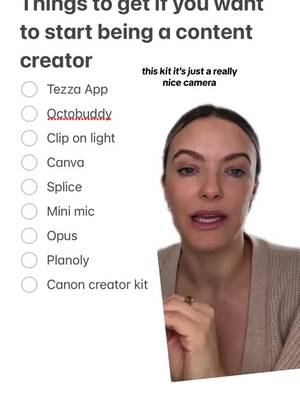

Gadgets that help creating content easier as a content creator!
Creative Tools · Laptop Display, Creator face over in-app footage, Title + app screenshots slideshow
Why it beat its usual
74.6xthe views @aligrnt usually gets
91K views
- This video91K
- Usual views1.2K
- Creative Tools median2.6× the median viral factor of the 1,386 Creative Tools videos in the library (median 28.8x).
- Laptop Display median2.0× the median viral factor of the 3,122 Laptop Display videos in the library (median 37.8x).
- Creator face over in-app footage medianbelow the median viral factor of the 11,953 Creator face over in-app footage videos in the library (median 186x).
- Title + app screenshots slideshow medianbelow the median viral factor of the 1,345 Title + app screenshots slideshow videos in the library (median 142x).
- Views against the Creative Tools nichebelow the median of the 1,386 Creative Tools videos in the library (median 448,303).
- Engagement against the Creative Tools niche11.1%, above the Creative Tools median of 4.1%.
- Engagement
- 11.1%
How it's built
- Laptop Display
- Creator face over in-app footage
- Title + app screenshots slideshow
- Listicle hook
- App Mockup
- Screen Recording
- Slideshow
The hook promises a numbered list, built to tell the viewer what they get and how long it takes. Built as App Mockup, Screen Recording and Slideshow. A creator speaks as themselves, built to read like a post from someone the viewer follows. It presses on curiosity: wanting to know what happens or how. The tone is educational.
It is pitched at viewers who know solutions exist, so it names the kind of solution, not this one.
- Hook on screen
- “Gadgets that help creating content easier as a content creator!”
- First words said
- “These are the things that I would get”
What's said
4:15 · EnglishThese are the things that I would get if I wanted to start being a content creator tomorrow. Okay, first is the Tesa app. I have this app. I know most creators I work with utilize Tesa to do photo editing.
It also has video editing, so you can add, like, film and filters and blur and grain and, like, all of those things. It's super easy to use. I believe they have a free version and a paid version. It is a great app. I would definitely download it. Okay, next, I'm, like, kind of late to this trend, but this thing is called an octor buddy, and you just stick it to the back of your phone. Kind of looks like that. And it can literally stick to anything.
a mirror or glass. So you don't have to have, like, a tripod or things like that to film. Genius. You can just get this on Amazon. I think it's like $8. Okay, and then next is the clip on light. So this is the one I use. It's by new new Amoa. Um, and it just clips on your phone and then it is super, super bright. This one's dead. Um, highly recommend, because if you're filming late at night or after work, um, obviously you don't have natural light, so a clip on light really helps with that.
Canva. Canva is free. Download the app, use on your phone or a browser. It is incredible. For making, like, story slides or graphics or anything you might need your logo, all of that. Uh, splice. So splice is something I used to use for video editing, but now I primarily only edit within the apps, and then I'll use, like, Tic Save or different things like that to download the videos for other platforms. But if you want to edit out of platform, I really like splice.
Okay, this one is like, you don't need this. But if you do plan to do, like, talking to camera, um, having something like a little mini mic really does help with the sound. Especially if you, like, live in a busy area and it's really loud outside, this really helps. And then I also got this little guy, which is like a clip on mic that you can put on, like, right here, and it comes with this little, like, transmitter that you just plug into your phone, and it is really good.
Also from Amazon, and the mini mic is from Amazon, too. Okay, what's next? Okay, so Opus. Opus is an AI video editing software, and it basically allows you to upload, say, like, 30 minutes of video, and then you can say, cut me down five pieces made for TikTok. And you can add branding. It cuts them down, finds the most interesting parts of your video via AI, which is so crazy. Uh, planoly. So planoly is really great.
You don't need this. Like, You can do a free version of this in, like, Canva or something like that. But basically, it is a way to map out your feed and you can, like, move things, um, accordingly. I just find it really nice if you're really looking for, like, that aesthetic feed and you want it to all flow together. Okay, the last one in here, Canon Creator Kit. This is like a splurge, and I really don't think you need this if you wanna be a content creator.
Everything can be done on your iPhone, which is amazing. But if you wanna take it to the next level and you wanna do, like, blogs or longer form or you just want better quality, this camera, um, from Canon is so good. And it comes with, in the. They have literally something called a Canon Creator Kit, which is so funny. Um, but it comes with this, like, additional mic. It comes with, like, this handheld tripod, which is nice.
Um, you can see here. So this is like, if you're ready to go to the next level, you don't need it. It's expensive, um, but if you, like, you're there. This kit, it's just a really nice camera and comes with everything you would need. I have an Amazon storefront, so I'll link all this stuff into it and it'll be in my bio. But, yeah, I mean, some of this stuff is free and some of it's like $8. Again, you Don't need all of it, but I think these are tools that really help you.
Um, and especially if you're looking to be a content creator and have a full time job, these are things that'll help with efficiency and quality, um, which is what you would need at the stage in your career.
The words behind 74.6x its usual
Make your own
“Gadgets that help creating content easier as a content creator!”
Same format: Laptop Display
Highest viral factor first · All
 47KxPosting this in case he deletes it 🤯🚨
 42KxHOW TO START CLIPPING
 40Kxoh he don't wanna read all that?????? #womeninmalefields
 35Kxohh he's not reading all that?? okay then
 31KxThis App Tells You When You're Gonna DIE
 27KxInstall Sekarang !
 17Kxto the person who showed me how ai can take notes for me while i…
 17KxAfter 2 years of IELTS prep, I just found this????
 14KxI'm giving you a 0 you've clearly used AI
 13KxIs it just me or do college students not fully understand what…
 13KxRaise your hand if you have less than A thousand dollars in your…
 13KxBest AI Tools For Students
Same niche: Creative Tools
Highest viral factor first · All
 44KxSi tú también quieres ser #merlina usa mi código POPIA en @Glam AI…
 37Kxtutorial for photos like this
 27KxMe in my room taking random low quality selfies:
 18Kx"como te salen tan bien las fotos con flash?"
 18Kxestas fotos las saque YO???
 18KxNo sabia que las que hacemos crochet teníamos una app para nosotras
 17Kxus and our fav digicam app
 17KxFirst rule of IG: NEVER waste good photos like this
 15Kxupdate on the app i'm building with replit (and a sneak peek)
 14KxDon't they use this for corn?
 14KxAN ALLE, DIE WIEDER IN DIE SCHULE STARTEN!!!
 12KxYou're telling me there's an app that lets you print 45 free…
About this video
74.6x: about 74.6 times the views @aligrnt usually gets. Viral factor divides a video's views by its account's usual views, so it measures how far the video beat its creator's normal reach, whatever the size of the account. 11.1% engagement rate. 4,686 likes, 83 comments, 413 shares, 4,970 saves. Filed under Creative Tools, Laptop Display, Creator face over in-app footage and Title + app screenshots slideshow.