Viral Swipe File
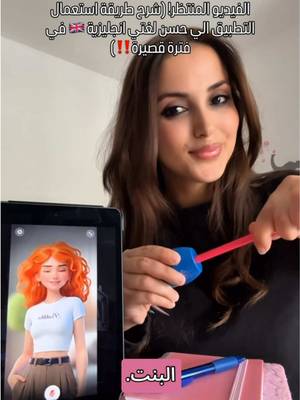

This is a voice-over video that explains how you can practice with me in the app.
Education · Live App Scroll, Step-by-Step Tutorial, Creator face over in-app footage
Why it beat its usual
148xthe views @englishwithbouchra7 usually gets
595K views
- This video595K
- Usual views4K
- Education median1.8× the median viral factor of the 6,803 Education videos in the library (median 84.6x).
- Live App Scroll medianbelow the median viral factor of the 2,335 Live App Scroll videos in the library (median 206x).
- Step-by-Step Tutorial median1.4× the median viral factor of the 681 Step-by-Step Tutorial videos in the library (median 108x).
- Creator face over in-app footage medianbelow the median viral factor of the 11,946 Creator face over in-app footage videos in the library (median 186x).
- Views against the Education niche2.3× the median of the 6,803 Education videos in the library (median 262,473).
- Engagement against the Education niche3.7%, below the Education median of 8.6%.
- Engagement
- 3.70%
How it's built
- Live App Scroll
- Step-by-Step Tutorial
- Creator face over in-app footage
- Explainer hook
- Screen Recording
- App Mockup
The hook shows how the product works, built to make it clear in a few seconds. Built as Screen Recording and App Mockup. A creator speaks as themselves, built to read like a post from someone the viewer follows. It presses on curiosity: wanting to know what happens or how. The tone is educational.
It is pitched at viewers who know solutions exist, so it names the kind of solution, not this one.
- Hook on screen
- “This is a voice-over video that explains how you can practice with me in the app.”
- First words said
- “Hi, I’m a friend of this girl.”
What's said
2:03 · EnglishHi, I’m a friend of this girl. She told me to tell you this is a voice-over video that explains how you can practice with me in the app. Alright, no more joking around—focus and follow along with her. And thank her in the comments, okay? Or I’ll be upset.
When you open the app, in Praktika, you’ll see the first page like this. Okay. Then tap the language, English, at the top. I chose English because I want to learn English. You can choose whatever languages you want to learn. After that, go to Settings and choose what language the avatar will speak to you in. The avatar. Here, I chose Arabic, because I’m Arab, of course. Then tap Twitter, which is where the avatars are.
Scroll down, and you’ll find all the avatars, the locked ones and the free ones, okay? Now, how do you study in the app? Here you’ll find all the steps—a study plan you can follow step by step. Just like you can see here. They’re all study steps, so you can learn English based on your schedule and the way you want to learn it in the app. When you download it for the first time, you enter all your details: how long you want to study, and all that.
And if you get bored of that option, there’s Practice, which is Start Free Talk. With this option, you can talk to the avatar about topics you choose yourself, and you can even create a custom scenario. Meaning you decide exactly what you want to practice. Here I put: “Get ready for a meeting with the president.” And honestly, stuff like this helps me focus more on the topics I want to learn. And here, like you can see, I set the custom scenario, which is my role.
I set it as the employee, and the manager is the avatar. So I chose the Sky avatar here because I love it. I really love learning with Sky. And that’s it. It starts and gives me the greeting, this communication practice: “Meeting with Boss.” It gives me everything I need to practice. Okay, it goes back and forth with me like this, in English, and it corrects my mistakes and all those details. And if you want the camera to show you everything in full screen, what do you do?
This is the option. Tap it, and it makes Sky bigger, so it fills the whole screen and you can see everything. So what are you waiting for? Come on! Go download the app, and come chat with me there. If you don’t download it, I’ll be upset. And I’ll stop making videos for you—come on!
The words behind 148x its usual
Make your own
“This is a voice-over video that explains how you can practice with me in the app.”
Same format: Live App Scroll
Highest viral factor first · All
 29KxWhy is Spanish so hard???
 27Kxwhy are you reading at 11:50pm?
 26KxI didn't know this could happen during Perimenopause!?!
 26Kxi found the cutest wedding idea ever!
 20KxWhy is Spanish so hard???
 19KxWHY IS TURKISH SO HARD
 18KxUr telling me I shopped at Aldi for 8 YEARS and never knew this?!?!?
 18Kx"como te salen tan bien las fotos con flash?"
 18KxGIRLS I GOT MY PERIOD!!!
 17KxAfter 12 years I learned you do Amazon completely wrong
 17KxFlirted so hard, this is how my boyfriend updates me 🤭🤭
 16KxMy FAVORITE cooking hack is this app 🙌🏼
Same niche: Education
Highest viral factor first · All
 110KxWhy is Spanish so hard???
 75Kxthis is me after I installed the knowunity app:
 55KxPOV you finished studying 4 hours early bc you listened to this guy…
 53Kxthe easiest way to learn a language
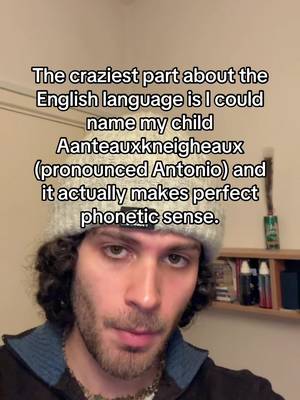 47KxThe craziest part about the English language is I could name my…
 42KxWTF did i just find in my LAST YEAR OF UNI 😭
 41KxWalking on stage confidently with my high grades
 37Kxtoday I said Bonjour to a sweet old lady in Paris
 34Kxhalf our class got caught using ChatGPT 😭😭😭💀
 34Kxpov: you finally delete duolingo
 30KxI said Bonjour to a sweet old lady in Paris.
 23KxSo how do you say "drunk" in Spanish?
About this video
148x: about 148 times the views @englishwithbouchra7 usually gets. Viral factor divides a video's views by its account's usual views, so it measures how far the video beat its creator's normal reach, whatever the size of the account. 3.7% engagement rate. 11,725 likes, 467 comments, 1,712 shares, 8,165 saves. Filed under Education, Live App Scroll, Step-by-Step Tutorial and Creator face over in-app footage.